When you open Event history, you can see the status of all requests
you've made for files, including instant downloads.
You can also begin downloading any sets of files you've requested.
For more information, see
Choosing Delivery Method in McAfee Online Backup Online
and
Getting Files Selected from McAfee Online Backup Online.
Figure 1. Event History
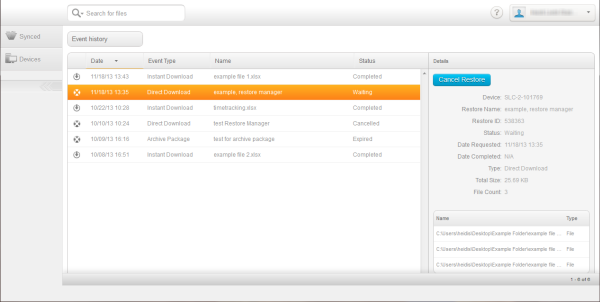
You can sort Event history in ascending or descending order by clicking
either the Date or Event Type column label. In Event history, you can see this
information:
| Column
|
Description
|
| Date
|
The date and time that you submitted your
request for a set of files to be restored.
|
| Event Type
|
Identifies the delivery method you specified
when you requested the set of files:
- Instant Download
- Direct Download
- Archive Package
|
| Name
|
The name you provided for a set of files.
|
| Status
|
If the type is Direct Download, the
statuses are:
- Waiting: You need
to get the Restore Manager to start downloading your files
- Waiting: You need
to start the Direct Download of your files
- In Progress: Your
files are being restored by the Restore Manager.
- Completed: Your
files have been restored by the Restore Manager.
- Cancelled: Your
restore request has been cancelled.
To cancel a request for a direct
download, click
 under Action before the status becomes In
Progress. You cannot cancel a request once it is in progress. under Action before the status becomes In
Progress. You cannot cancel a request once it is in progress.
If the type is Archive Package, the statuses are:
- Processing: Your
files are being prepared for restore.
- % Complete: Your
files are being retrieved.
- Ready for
Download: Click the Download Links to download your files.
- Downloaded: You
have downloaded the set of files.
- Expired: Your
request and all downloadable files have expired.
- Cancelled: Your
restore request has been cancelled.
To cancel a request for an archive package restore, click
under Action before the status becomes Ready
for Download. You cannot cancel a request once it is ready for download.
|