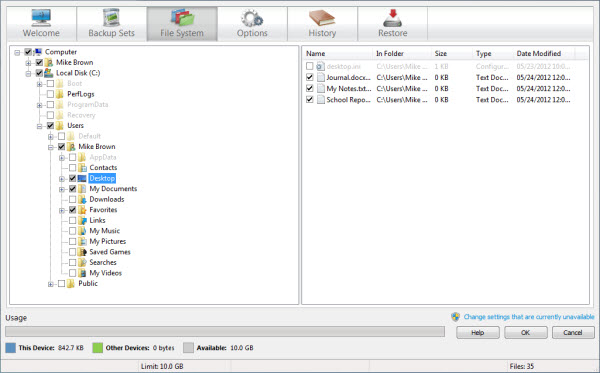
You can manually select or deselect any files or folders at any time using the File System tab on the Settings window. If you select a folder, any files later added to that folder are automatically included in backups. If selections were made using backup sets, you can review the File System tab to see exactly which files and folders are selected.
If you cannot change this setting and you use Windows, you may be able to resolve this issue yourself. For more information, see If Settings Are Greyed Out in the McAfee Online Backup Backup Software for Windows. You may not be able to change this setting if your account administrator is managing it for you.
-
Open the Settings window. Choose one of the following actions:
- (Windows 8) On the Start screen, click the McAfee Online Backup Settings tile.
- (Windows 7 or earlier)
Right-click the McAfee Online Backup icon
 in the notification area, then select
.
For more information, see
Open the Backup Software on Windows through the Notification Area.
in the notification area, then select
.
For more information, see
Open the Backup Software on Windows through the Notification Area.
- Click the File System tab. Your computer's file system is displayed in the left pane.